

Unlike flat projects that rely on a single ironed layer, 3D Perler bead creations require you to construct multiple interlocking panels, then fuse them together at specific angles. This adds complexity, but also allows for incredible structural possibilities.

In this guide, we'll cover everything you need to know to get started with 3D Perler bead projects, including:
- Essential tools and materials
- How to plan and design 3D templates
- Step-by-step instructions for assembling your first cube
- Advanced techniques for curves, hinges, and moving parts
- Troubleshooting common problems (warping, weak joints, etc.)
Whether you're a complete beginner or an experienced Perler artist looking to level up, this guide will help you transform flat beads into dimensional art you can hold, display, and use.
What Are 3D Perler Beads?
Strictly speaking, there's no special "3D Perler bead" – the beads themselves are the same standard cylindrical fuse beads (5mm diameter). What makes a project "3D" is how you arrange, fuse, and assemble the beads into freestanding forms.
The basic principle is simple: you create flat panels (like walls, roofs, or sides of a box) on a pegboard, iron them just enough to fuse beads together but not so much that the holes close completely. Then you connect these panels edge-to-edge or angle-to-angle using additional beads, ironing, or even glue.
This technique is similar to building with 2D cross-sections that form a 3D volume. For example:
- A cube requires 6 square panels.
- A triangular prism needs 2 triangles and 3 rectangles.
- A house could have 4 walls, 2 roof panels, and a base.
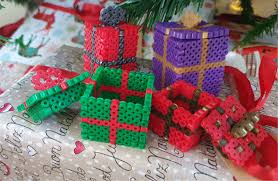
3D Perler bead art is popular among makers because it combines the nostalgia of classic pixel art with the satisfaction of building something structural. You can create toys, decorative sculptures, desk organizers, gifts, and even cosplay props.
Because the beads are lightweight and rigid after fusing, 3D structures can be surprisingly sturdy – especially if you reinforce corners or use a technique called "full fuse" (where beads melt completely into a solid sheet).

Essential Tools & Materials for 3D Projects
To succeed with 3D Perler bead designs, you'll need a few basic items plus some optional upgrades.
Must-have supplies:
- Perler beads (or any major brand like Nabbi, Artkal) – standard 5mm midi size.
- Pegboards – square or rectangular are best. Interlocking boards allow larger panels.
- Ironing paper (parchment paper works fine)
- Clothes iron (dry iron, no steam)
- Tweezers or bead pen – essential for placing beads precisely.
- Spudger or craft knife – for lifting panels off the pegboard.
- Heavy flat object (like a book) – to keep panels flat while cooling.
Helpful extras for 3D assembly:
- Extra pegboards – so you can prepare multiple panels at once.
- Masking tape – for the "tape method" (removing fragile designs from the board before ironing).
- Needle-nose pliers – for holding hot panels during angle-fusing.
- Craft glue – as backup for stubborn joints.
- Small hand drill or heated awl – to reopen bead holes if they close during ironing (important for hinged or stackable designs).
Don't use: mini beads (2.6mm) for large 3D builds – they're too small to support weight. Also, avoid high heat or over-ironing, which melts panels into shapeless blobs.
Step-by-Step – Building a 3D Cube
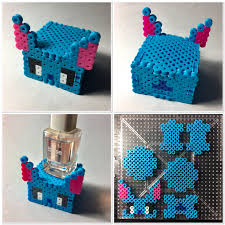
A cube is the perfect first 3D Perler bead project. It teaches you panel-making, even ironing, and 90° joining.
Step 1: Design your panels
You'll need 6 identical squares. A good starter size is 10×10 beads. Draw a simple pattern or leave them solid.
Step 2: Create each panel
- Place beads on a pegboard.
- Cover with ironing paper.
- Iron on medium heat (about 3/4 of max) using circular motions until beads fuse lightly. You want the holes to remain visible.
- Let cool under a heavy book.
- Repeat for all 6 squares.
Step 3: Plan the assembly order
Think: bottom, four sides, top. Assemble upside down? Sometimes easier.
Step 4: Join two panels at 90°
- Place one panel flat. Hold the second panel vertically against its edge.
- Use a heated iron tip (carefully!) to melt the contact beads just enough to tack them together.
- Or use the "tape method": align panels edge-to-edge on tape, then iron the joint from both sides.
Step 5: Build up the cube
Attach the four side panels around the base, then place the top panel. Check right angles often.
Step 6: Reinforce (optional)
Run a bead of glue along inside seams, or add a few extra melted beads to weak corners.
Step 7: Final cooling
Once assembled, let the cube sit undisturbed for an hour.
Troubleshooting:
- Panels warped? Redesign with a "skeleton" of beads (leave small holes for ventilation).
- Joints falling apart? Iron a bit longer, or use glue.
- Holes closed? Reopen with a heated pin.
Advanced 3D Techniques
Once you've mastered the cube, try these techniques to expand your 3D Perler bead skills.
Curved surfaces
You can't bend a fused panel, but you can approximate curves by building stepped panels (like pixel-art circles) or using small triangular panels. For a cylinder, build a rectangular panel and join its short edges.
Moving parts
Use an unfused bead as a hinge pin. For example, create two panels with matching holes, insert an unironed bead through both, then carefully heat only that bead's ends to lock it in place while allowing rotation.
Reinforced corners
Instead of a single bead at the edge, use a 2×2 block at each corner. This distributes stress and makes the joint much stronger.
Functional hinges
Sewing thread or thin wire passed through bead holes can create fully movable joints. Combine with a small drop of glue on the anchor points.
Stackable modules
Design panels with open holes on top and bottom, so you can connect multiple units vertically – great for towers, creatures, or modular storage.
Lighting integration
Use clear or transparent beads for a "glass" effect. Place a small LED tea light inside a hollow 3D structure to create a glowing Perler lantern.
Tips for Designing Your Own 3D Templates
Creating your own 3D Perler bead designs is deeply satisfying. Here's how to start.
- Think in 2D slices
Any 3D form can be sliced into parallel layers (like a CT scan). Each layer becomes a Perler panel. For example, a dinosaur might have 10–20 horizontal slices. - Use graph paper or software
Draw each panel on grid paper. Or use free tools like Perler.com's pattern designer or Bead Studio. Label which edges connect to which. - Start with simple polyhedra
Cubes, rectangular prisms, pyramids, and triangular prisms are easy to plan. Combine them like building blocks. - Leave tab-and-slot connections
Instead of just butt joints, design a few beads that extend from one panel and fit into holes on another panel. This creates a mechanical lock before ironing. - Test a small version first
Before making a large, complex model, build a miniature version at 50% scale (fewer beads). This helps you catch design flaws. - Document your template
Take photos of the assembled structure from all sides, and save your bead layouts. Share them online – the Perler community loves free templates.
Common Mistakes & How to Avoid Them
Even experienced crafters run into issues with 3D Perler beads. Here are the most frequent problems and solutions.
| Mistake | Why it happens | Fix |
|---|---|---|
| Panels won't stay together | Under-ironing or wrong bead alignment | Use a slightly longer iron time; ensure contact beads touch fully |
| Warped base | Uneven cooling or too much heat | Cool under a heavy book; iron less on large panels |
| Beads fall off board | Moving board before taping/ironing | Use tape method; hold board steady |
| Joints crack | Stress from a tight fit | Design slots slightly larger; pre-warm the bead holes |
| Holes completely closed | Over-ironing | Lower heat; iron just until beads stick |
| Lopsided structure | Panels not identical in size | Count beads carefully; use same pegboard for matching panels |
Pro tip: Always make one extra panel for critical projects. If a panel gets ruined, you have a backup without redoing the whole design.
Final Thoughts
3D Perler bead art transforms a simple childhood craft into a platform for engineering, sculpture, and design. Whether you build a tiny house, a geometric lamp, or a fully articulated robot, the process teaches patience, spatial thinking, and creative problem-solving.
Start small – master the cube. Then experiment with curves, hinges, and lighting. Share your work online using hashtags like #3DPerlerBeads or #PerlerArt. And don't be afraid to melt, remelt, and redesign. Every failed joint teaches you something new.
Remember: the best 3D Perler projects aren't perfect – they're personal. Your first cube might be slightly crooked, but it's yours. And with each new design, you'll get better, faster, and bolder.
Now grab your pegboard, pick your colors, and start building upward.